

Share on
Multiple payment gateways and manual invoicing can be a costly distraction for growing businesses. There are data gaps and revenue leaks that could create roadblocks. Integrated payment solutions come as a solid answer to these problems.
It’s a market skyrocketing toward a massive 30.3% CAGR as e-commerce booms.
If you're ready to stop managing roadblocks and start streamlining operations, you’re in the right place. This is your 5-step guide to implementing the perfect integrated payment solution. But before we do that, let’s look at the differences between integrated and non-integrated payment solutions.
A Comparison Between Non-Integrated and Integrated Payment Solutions
We now know that integrated and non-integrated payment solutions differ in terms of tech and speed. The table below makes it even more clear how the two methods stand apart when it comes to core components:
Feature | Integrated Payments ✅ | Non-Integrated Payments ❌ |
Data Flow | Information moves automatically between connected systems. | Data remains siloed across separate platforms. |
Payment Processing | Payments are processed and recorded instantly. | Payments are processed separately from business records. |
Data Entry | Minimal manual input required. | Manual entry is needed across multiple systems. |
System Connectivity | Sales, inventory, accounting, and CRM tools work together. | Business tools operate independently with little or no connection. |
Accuracy | Automated syncing reduces human error. | Higher risk of mistakes, duplicate entries, and mismatched records. |
Operational Efficiency | Workflows are streamlined through automation. | Teams have to do admin tasks repeatedly. |
Reporting and Insights | Real-time visibility into sales, inventory, and cash flow. | Information is scattered, making reporting slower and less accurate. |
Scalability | Easily supports business growth and higher transaction volumes. | Gets difficult to manage as the business expands. |
Customer Experience | Faster transactions and fewer delays. | Potential delays caused by disconnected systems and manual processes. |
Overall Impact | Creates a unified, efficient payment ecosystem. | Leads to fragmented processes and operational inefficiencies. |
If you want a clearer visual, the scorecard below gives further insight into how each method stands in terms of these factors:
| Integrated | Non-Integrated |
Automation | ⭐⭐⭐⭐⭐ | ⭐⭐ |
Accuracy | ⭐⭐⭐⭐⭐ | ⭐⭐ |
Efficiency | ⭐⭐⭐⭐⭐ | ⭐⭐ |
Visibility | ⭐⭐⭐⭐⭐ | ⭐ |
Scalability | ⭐⭐⭐⭐⭐ | ⭐⭐ |
How to Choose an Integrated Payment Solution
To outpace the competition, you need a payment setup that just works. Although integrated payments solve major logistical issues, maximising their value requires the right strategy. Keep reading for a foolproof, 6-step guide to choosing the best platform for your needs.
Step 1: Audit Your Existing Software Architecture
Map out your current technology stack to see how well it plays with others. Start by evaluating your primary consumer touchpoints (such as your Point-of-Sale (POS) system or e-commerce platform (like WooCommerce or Shopify). Then, determine whether they natively support a unified commerce approach.
This audit means tracing how transactions flow from the checkout counter (or online cart) directly into backend systems or supply chain management software.
Ask yourself: Where are the operational gaps? Is your staff manually re-entering transaction data from your online store into your accounting software? Or, is your physical storefront inventory syncing with your website in real time?
If you spot any loopholes here, you are wasting time and risking costly human error.
This is where advanced tech providers enter the picture. Global merchants frequently turn to unified payment platforms like Antom. Its payment orchestration allows businesses to bridge the gaps in their existing software using a single integration.
You don’t have to build separate pipelines for different regions. Its unified solution connects with your existing setup to instantly open access to over 300 payment methods across hundreds of markets.
Step 2: Find a Provider Who Can Fuel Your Growth
The next step is to choose a reliable payment provider.
This is often a make-or-break decision for global sellers. You need to find someone who does far more than simply process credit cards. It should be someone who gives enterprise-level support and solid security compliance.
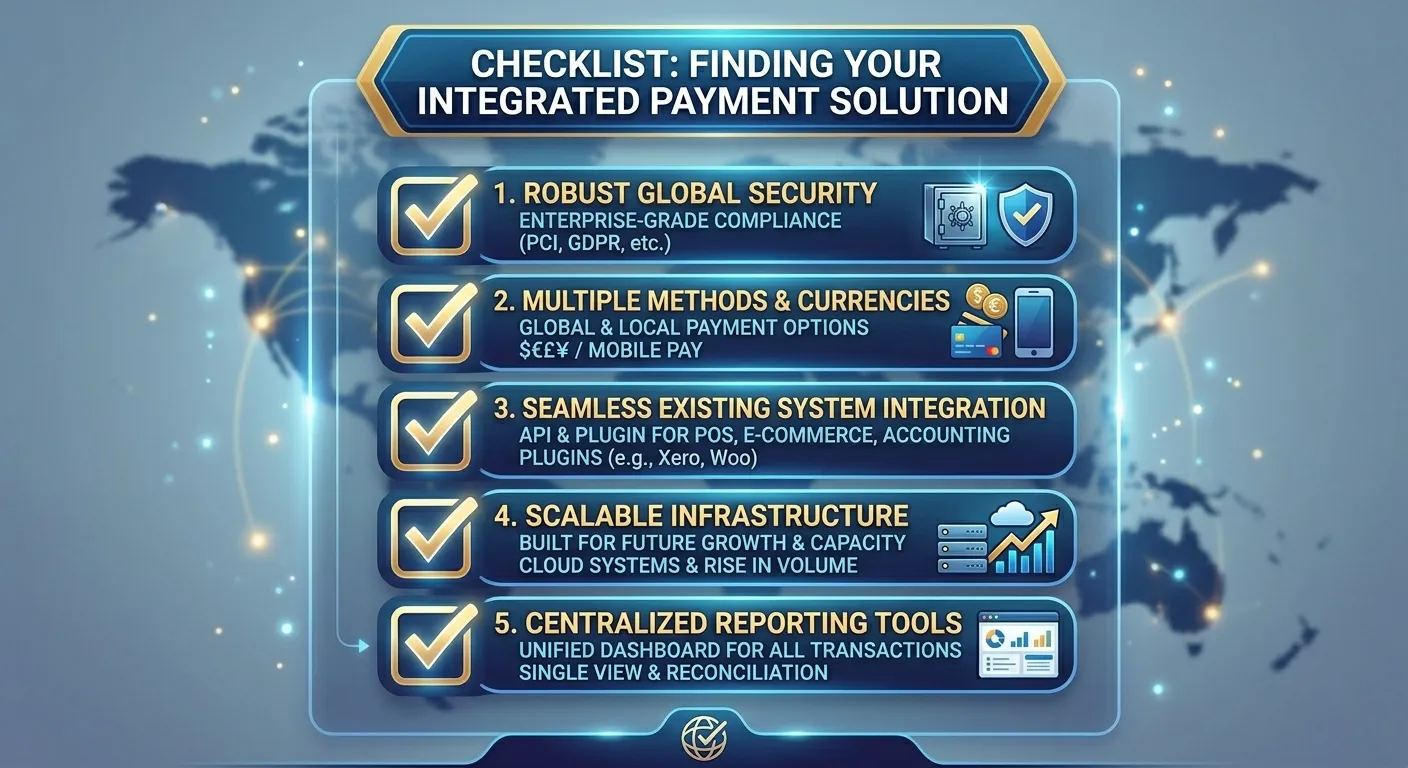
Image Source: Google Gemini
Crucially, your chosen system must align with the specific payment habits of your target audience. For instance, a small local retailer might focus heavily on finding a POS provider that syncs with inventory tools to simplify end-of-day reconciliation. But international brands face a much steeper hurdle, i.e., payment fragmentation.
Mordor Intelligence market report found that digital transaction solutions contributed 67.8% of payment market revenues. During these, online and remote transactions expanded rapidly at a 20.39% CAGR. This shift highlights why merchants are aggressively moving away from single-processor arrangements towards integrated setups that capture a wider pool of digital consumers.
Again, we suggest Antom for its highly adaptable integrated payment solution. It handles the back-end complexity of currency conversions (supporting over 140 currencies) and foreign exchange optimisation. This allows your finance team to manage global payouts and reconciliation through a single dashboard.
Step 3: Connect and Sync Your Tech Ecosystem
After selecting the provider, it’s time to link your payment gateway, POS, and accounting tools. They ensure that the data flows automatically across your business. The end goal is real-time synchronisation. It ensures that your ledgers and transaction records are updated to the exact millisecond a purchase is made.
You have to choose either of the two implementation paths:
- Pre-Built Integrations (Plug-and-Play): Many modern platforms have ready-made plugins or extensions. They don’t require technical expertise. In fact, they can easily connect standard shopping carts or POS systems to your payment processor.
- Custom API Integrations: An Application Programming Interface (API) allows your development team or software vendor to build a custom connection. This is specifically tailored to your backend logic.
Use your provider’s sandbox environment before going live. This is an isolated staging ground where your team simulates transactions. They can catch data bugs before they cause big problems for the business.
Step 4: Configure Localised Payment Rails and Validate the Checkout UX
After connecting the system infrastructure, you should optimise the consumer-facing checkout experience. This step is about activating the exact payment methods your target audience expects. You also have to ensure that the front-end user experience is entirely frictionless.
Work on Matching Local Consumer Preferences
Offering just a standard credit card field is no longer enough to boost conversions. Cart abandonment often happens at the very last second. It usually happens when a customer’s preferred payment method isn’t available. Therefore, you should work on providing a mix of traditional and alternative payment methods (APMs).
Run Front-End Customer Journey Diagnostics
Instead of testing the technical backend pipeline (which you completed in the sandbox), use this stage to review the payment process from the customer's perspective.
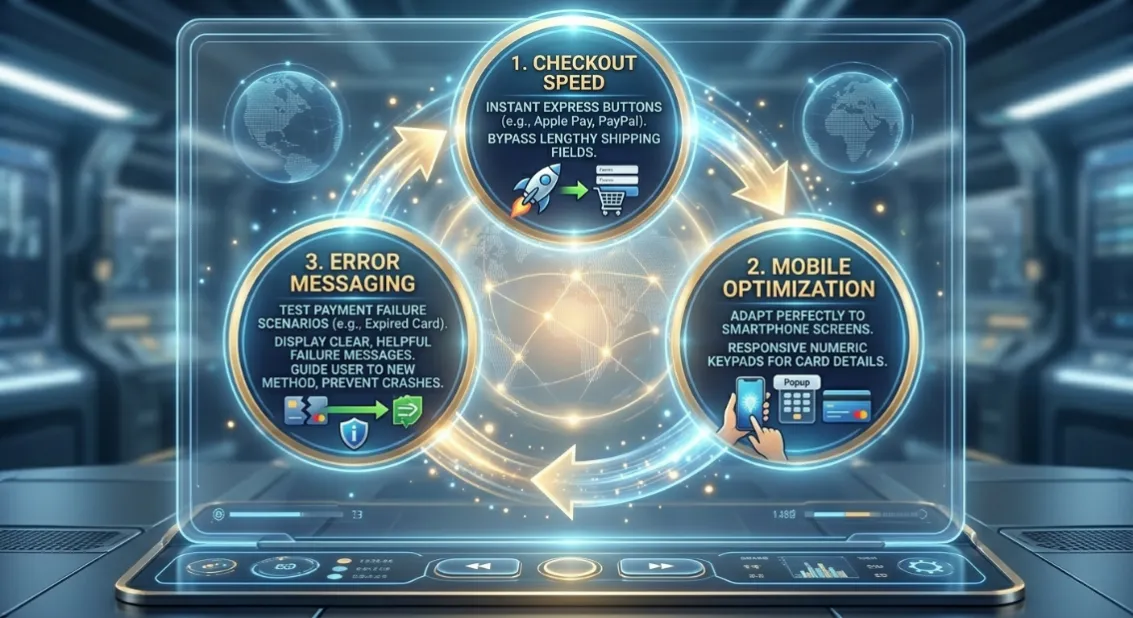
Image Source: Google Gemini
Step 5: Upskill Your Team and Set Performance Guardrails
Launching an integrated payment system can change your daily backend operations. Your staff must be fully equipped to navigate the new platform. And they need training to handle the new systems. These upskilling sessions should target two distinct operational groups:
- Staff who deal with customers
- Finance teams in the back office
Note that your employees are your first line of defence. They must have complete information about technical difficulties and customer frustration. Alongside, they must know how to handle multi-channel payment issues on the spot. Teach them how to quickly look up a transaction status and troubleshoot failed alternative payment method (APM) transactions.
All of this should happen without sending basic queries to your IT team.
A quick word: Rather than forcing your staff to learn five different dashboards for five different regions, consider Antom. Its unified dashboard consolidates global transaction data. You get all the info in a single view. Train your finance team to leverage Antom’s advanced operational tools to monitor cross-border currency conversion performance and detect real-time payment anomalies.
Conclusion
This was a complete roadmap for setting up an integrated payment solution. It’s pretty clear that setting up this payment setup is a strategic power move. Steps like auditing your tech stack or bringing your team to one page require a lot of work. When done right, it fixes the leaks in your sales funnel and buys back the time you need to actually focus on growth.
Scaling internationally shouldn't mean managing a maze of payment gateways. Follow these steps to build a payment ecosystem that supports growth. When you play the right cards, you can find your business in a better place, financially and in terms of reputation, too.
So, stop plugging leaks. Start building for scale!
Frequently Asked Questions (FAQs)
How long does it typically take to implement an integrated payment solution?
Implementation timelines vary according to a system’s complexity. A business that uses standard e-commerce platforms can often deploy integrated payments within weeks. On the other hand, organisations that need custom workflows, multiple regional payment methods, and ERP integrations may need several months.
Can integrated payment solutions help with regulatory compliance?
Yes. Providers recently have built-in compliance features such as PCI DSS support, fraud monitoring, transaction tracking, and audit trails. These features allow a business to meet financial and data-security requirements while reducing manual compliance work.
What are the metrics a business should track after implementation?
Key performance indicators that a business should watch out for include: payment approval rates, cart abandonment rates, transaction processing times, reconciliation accuracy, chargeback levels, and operational efficiency. Monitoring these metrics helps businesses measure ROI and identify areas for improvement.