
Share on
In Japan, bank transfer is a payment method that is widely used for a variety of scenarios, such as bill payments, goods purchases, and peer-to-peer transfers. It is favoured by users across all age groups due to its high security, accuracy, and the ability to confirm receipt of funds in real time.
Despite the growing popularity of online and mobile bank transfers, offline transfer methods still account for a meaningful share of transactions. A considerable number of Japanese consumers still prefer to visit bank counters or use ATMs to complete payment transfers after shopping on e-commerce platforms, reflecting their trust in and reliance on traditional payment processes.
Within this payment ecosystem, Pay-easy, as an important bank transfer service in Japan, plays a key role in connecting online transactions with offline payments. Users can complete payments via online banking or offline ATMs using Pay-easy, which supports a wide range of scenarios including utility bills, tax payments, and e-commerce purchases.
Pay-easy is particularly popular among consumers who do not have credit cards or who prefer cash-based transactions. Its system is connected to over 550 banks and supports approximately 43,000 ATMs nationwide, enabling both online banking users and bank account holders without digital banking access to complete transactions conveniently.
Regarding fees, Pay-easy generally offers lower transaction processing fees than credit cards, digital wallets, and some Konbini payments, making it a cost-efficient option.
In terms of security mechanisms, every Pay-easy online banking transaction requires authentication through one or a combination of methods, including passwords, one-time verification codes, biometrics (such as fingerprint or facial recognition), SMS, or card readers. In addition, the system does not support chargebacks arising from fraudulent disputes, further ensuring transaction security.
According to 2023 data, the number of Pay-easy transactions conducted through online banking reached 2.3 million, with total transaction value climbing to JPY 55.43 trillion, demonstrating the sustained influence of this payment method. At the same time, Pay-easy continues to expand its collaboration with international payment platforms, helping global merchants integrate local bank transfer capabilities and broaden their cross-border payment reach.
Properties
The following table lists the product properties supported by Pay-easy:
Payment type | Online banking | ||
Acquirer | AntomSG, AntomUS, AntomEU, AntomUK, AntomJP | Merchant entity location | SG, HK, US, EU, UK, JP |
Payment flow | Redirect | Refund | ❌ |
Buyer country/region | Japan | Partial refund | ❌ |
Processing currency | JPY | Chargeback/Dispute | ❌ |
Minimum payment amount | JPY 1 | Default timeout | 7 days |
Maximum payment amount |
| Time to return payment result | Real-time |
User experience
Note: The following payment flows on different terminals are for reference only. For supported merchants' terminal types, consult Antom Technical Support.
By default, buyers are redirected to the Antom page for information collection during each transaction through Pay-easy. However, buyers can choose to bypass the Antom page. In this case, during the first payment, they can enter and save their information on the merchant page for future transactions.
After selecting Pay-easy, buyers can choose to complete the payment via either ATM or online banking. The following sections outline the user experience for each method.
Pay-easy (via ATM)
Pay on the Antom page
The following screenshots show the journey of paying on the Antom page:
Web
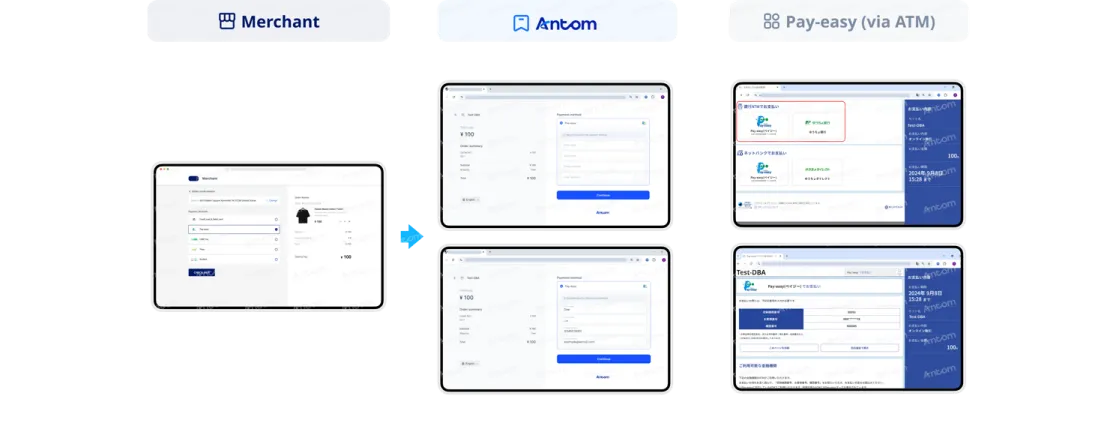
- The buyer selects Pay-easy to pay.
- The buyer is redirected to the Antom page.
- The buyer provides the required information and clicks Continue.
- The buyer is redirected to a middle page and selects ATM.
- The buyer obtains an ATM payment code and proceeds to an offline ATM to complete the payment.
App
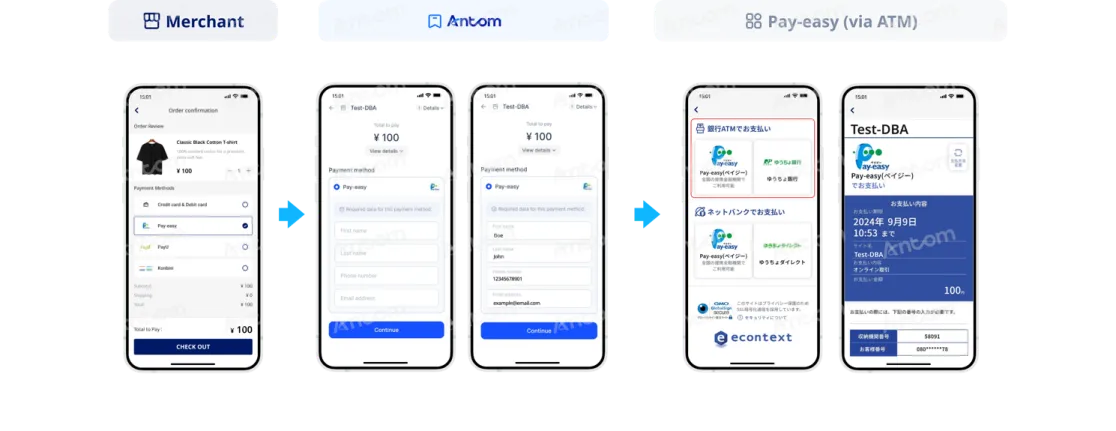
- The buyer selects Pay-easy to pay.
- The buyer is redirected to the Antom page.
- The buyer provides the required information and taps Continue.
- The buyer is redirected to a middle page and selects ATM.
- The buyer obtains an ATM payment code and proceeds to an offline ATM to complete the payment.
Bypass the Antom page
The following screenshots show the journey of paying outside the Antom page:
First-time payment
The buyer is redirected to the merchant page for information collection.
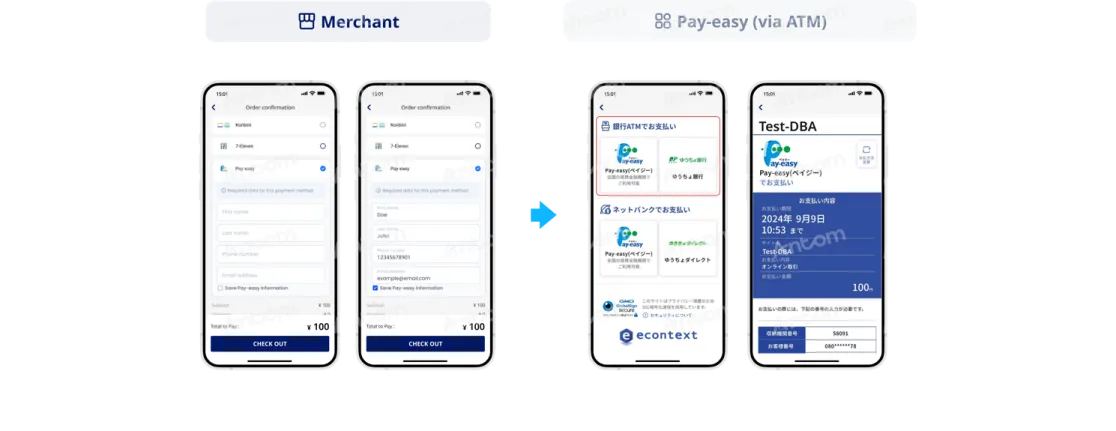
- The buyer selects Pay-easy to pay.
- The buyer provides the required information and saves it for subsequent payments.
- The buyer is redirected to a middle page and selects ATM.
- The buyer obtains an ATM payment code and proceeds to an offline ATM to complete the payment.
Subsequent payments
Subsequent payments can be made by buyers who saved their information during the first-time payment, allowing them to bypass the information collection step to make quick payments.
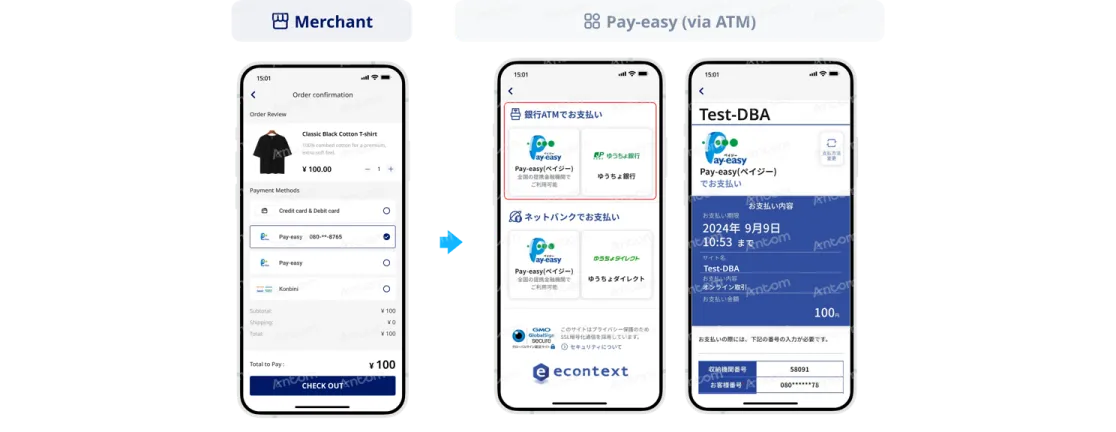
- The buyer selects Pay-easy to pay, using previously saved information.
- The buyer is redirected to a middle page and selects ATM.
- The buyer obtains an ATM payment code and proceeds to an offline ATM to complete the payment.
Pay-easy (via online banking)
Pay on the Antom page
The following screenshots show the journey of paying on the Antom page:
Web
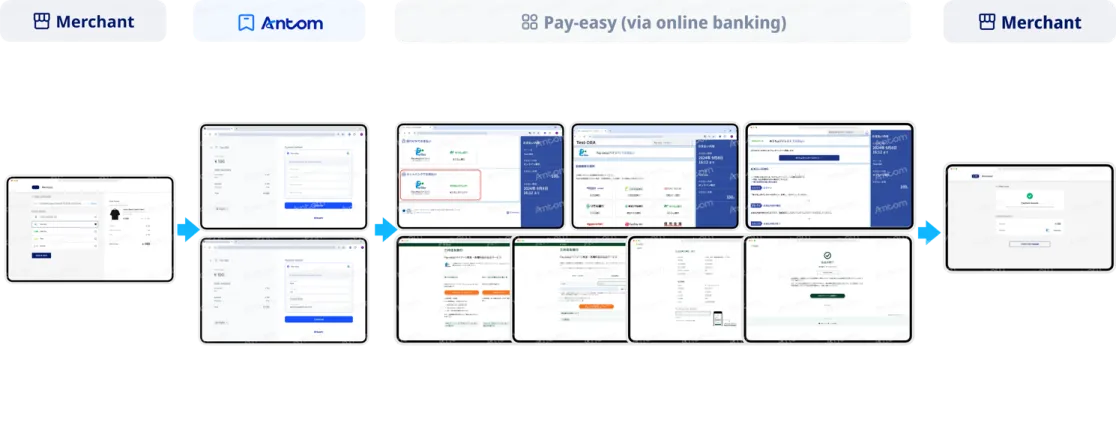
- The buyer selects Pay-easy to pay.
- The buyer is redirected to the Antom page.
- The buyer provides the required information and clicks Continue.
- The buyer is redirected to a middle page and selects online banking.
- The buyer selects the bank to pay.
- The buyer confirms to pay with the selected bank.
- The buyer is redirected to the online banking page to complete the payment.
- The buyer is redirected to the merchant's result page.
App
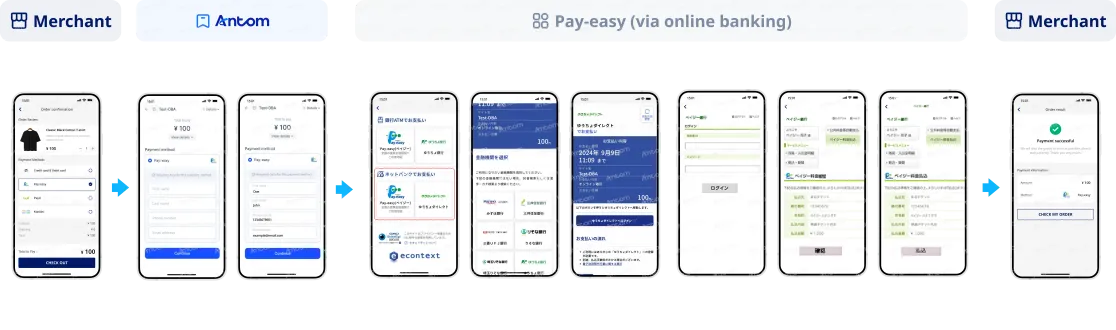
- The buyer selects Pay-easy to pay.
- The buyer is redirected to the Antom page.
- The buyer provides the required information and taps Continue.
- The buyer is redirected to a middle page and selects online banking.
- The buyer selects the bank to pay.
- The buyer confirms to pay with the selected bank.
- The buyer is redirected to the online banking page to complete the payment.
- The buyer is redirected to the merchant's result page.
Bypass the Antom page
The following screenshots show the journey of paying outside the Antom page:
First-time payment
The buyer is redirected to the merchant page for information collection.
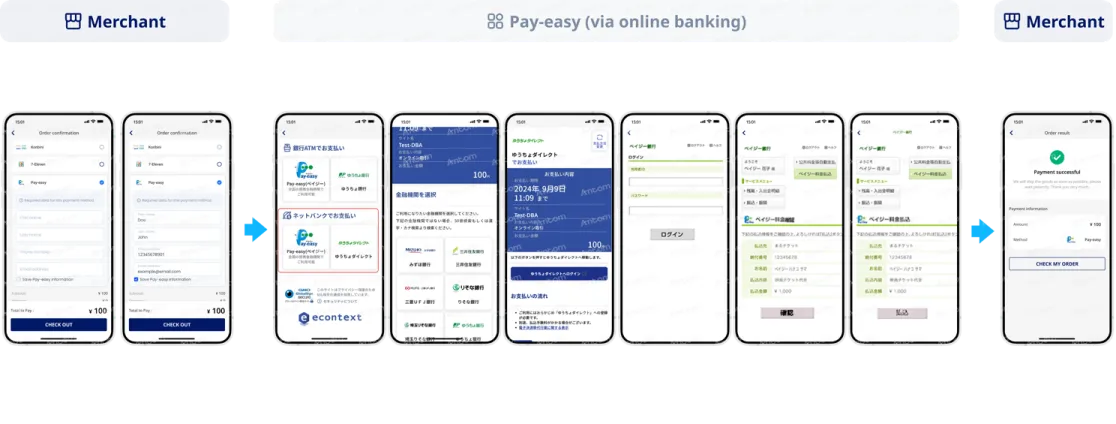
- The buyer selects Pay-easy to pay.
- The buyer provides the required information and saves it for subsequent payments.
- The buyer is redirected to a middle page and selects online banking.
- The buyer selects the bank to pay.
- The buyer confirms to pay with the selected bank.
- The buyer is redirected to the online banking page to complete the payment.
- The buyer is redirected to the merchant's result page.
Subsequent payments
Subsequent payments can be made by buyers who saved their information during the first-time payment, allowing them to bypass the information collection step to make quick payments.
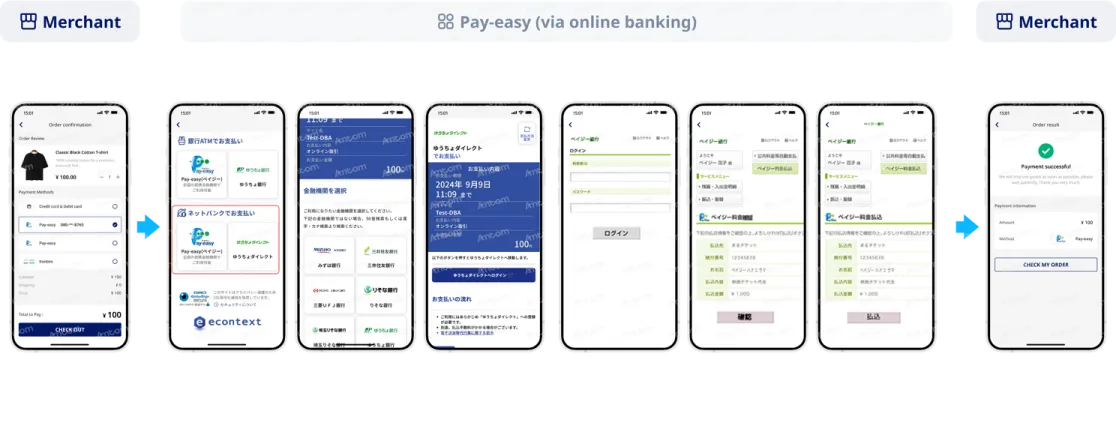
- The buyer selects Pay-easy to pay, using previously saved information.
- The buyer is redirected to a middle page and selects online banking.
- The buyer selects the bank to pay.
- The buyer confirms to pay with the selected bank.
- The buyer is redirected to the online banking page to complete the payment.
- The buyer is redirected to the merchant's result page.
FAQs
1. How does Pay-easy differ from other online payment methods in Japan?
Pay-easy is a Japanese payment service primarily used for the payment of taxes and public utility bills. Previously, such payments typically had to be completed at financial institutions, post offices, or convenience stores. Pay-easy now supports transactions through multiple channels provided by Japanese financial institutions, including desktop online banking, mobile banking, and ATMs, offering clear advantages in terms of applicable use cases and convenience.
2. What are the differentiating advantages of Pay-easy?
As a highly recognised bank-based payment method in Japan, Pay-easy leverages a mature local financial network to establish several unique advantages. Pay-easy reaches more than 80% of bank users in Japan, effectively covering users who are accustomed to traditional financial channels, such as middle-aged and older consumers, as well as users with medium-to-high transaction value needs, helping merchants expand their payment channel coverage. Furthermore, because it operates within Japan's mainstream banking system, it provides enhanced transaction security, significantly reducing risks such as unauthorised transactions and fraudulent payments. In addition, it offers flexible payment amounts with no minimum payment limit, meeting both everyday low-value payment needs and medium-to-high value transactions, such as those for home appliances, consumer electronics, and luxury goods, thereby supporting merchants in targeting the mid-to-high-end consumer market in Japan.
3. What procedures are required to use Pay-easy in Japan?
No special procedures are required to use the Pay-easy service itself. However, to make Pay-easy payments via online banking, users must register for online banking services with a Japanese financial institution that supports Pay-easy.